
A Comprehensive Guide to Secure Authentication using SMS OTP
One of the most widely adopted methods for enhancing security is the use of SMS OTP (One-Time Password). You see that when you try to login to your mygov account, Momentum Energy Account, Westpac, Insurance companies like RACV or AAMI to name a few. This guide explores the ins and outs of SMS OTP, its benefits, challenges, best practices, and real-world applications.
What is an SMS OTP?
OTP stands for One-Time Password. As the name suggests, it’s a unique code that’s sent to your mobile phone via SMS (Short Message Service). It is a digital key that only works once and in most cases you have a limited time to input this key. When you try to log in to your online banking, change your password, or make a purchase, you might be asked to enter an OTP to prove it’s really you.
SMS OTPs are a crucial part of what we call two-factor authentication, or 2FA. This is a security measure that adds an extra layer of protection to your accounts. Instead of just needing a password, you need something else as well – in this case, that unique code sent to your phone.
To know more about the different types of OTP, click here to read the article
Why Use SMS OTP?
- Universal Accessibility: Australians are one of the biggest users of mobile phones with mobile penetration exceeding 100%. Since all mobile phones have the capability of receiving SMS, sending SMS OTP makes perfect sense.
- User Convenience: A majority of Australian users prefer SMS for OTP delivery due to its simplicity and convenience.
- Enhanced Security: Adds an extra layer of protection beyond just passwords, reducing the risk of unauthorised access.
How does it all work?
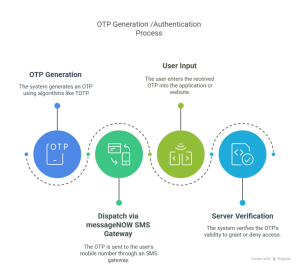
Common Use Cases for SMS OTP
- Finance and Banking: Banks and financial institutions such as Westpac, Commonwealth Bank, NAB rely heavily on SMS OTPs to authenticate users during online transactions, account logins, and fund transfers. For example: CommBank and ANZ use SMS OTPs to verify high-risk actions, ensuring only authorised users can proceed.
- E-Commerce Platforms: Online retailers like Amazon and eBay use SMS OTPs to confirm payments and prevent fraudulent purchases. This extra step ensures that only the legitimate cardholder can complete the transaction.
- Healthcare : Healthcare providers use SMS OTPs to secure access to patient records, complying with strict data protection regulations. For instance, My Health Record in Australia employs OTPs to authenticate users accessing sensitive medical information.
- Government Services : Services like myGov use SMS OTPs to verify identities when citizens try accessing tax records, Centrelink, or Medicare accounts online. An SMS OTP is sent to the person’s authorised mobile and only after inputting the correct digits, are you granted access.
- Travel and Tourism: Airlines and booking platforms (e.g., Qantas, Booking.com) send OTPs to confirm reservations and protect against unauthorised changes.
Advantages of SMS OTP
- High Accessibility : Unlike app-based authentication (e.g., Google Authenticator), SMS OTPs don’t require smartphones or internet connectivity. This makes them ideal for users in regional areas with limited infrastructure.
- Ease of Use : Most users are familiar with SMS, eliminating the need for additional training or app downloads. Not everyone is familiar with authenticator apps like Google Authentication, MS authenticator and the process of linking the authenticator app with the desired account you are trying to access.
- Cost-Effective : Implementing SMS OTP is relatively inexpensive compared to hardware tokens or biometric systems.
Quick Deployment
Businesses can integrate SMS OTP systems rapidly using SMS APIs from providers like Bulk SMS Now
Best Practices for SMS OTPs
If a business is going to use SMS OTPs, there are some things they should do to make sure it’s done properly:
-
- Message Optimisation:
-
-
-
- Content Clarity: OTP messages should be clear, concise, and easy to understand. This helps users recognise the message and reduces confusion. Example: “Your OTP is 123456. Valid for 60 sec. Do not share this code.”
- Timing: OTPs should be sent promptly. Delays can frustrate users and might even lead to them abandoning what they’re doing. Also, set a short expiration time (e.g., 2-5 minutes) to reduce misuse risks.
-
-
-
- Technical Considerations:
-
-
-
- API Integration: If using an API, make sure to use the latest version. Providers often update these, and it can affect how things work.
- Testing: Always test the system in a controlled environment before going live. This helps to iron out any bugs without affecting real users.
- Response Handling: Be prepared for different responses from the system, like errors or failures. This helps in troubleshooting and providing feedback to users.
-
-
-
- Security Measures:
-
-
-
- Two-Factor Authentication (2FA): Use 2FA to provide that extra layer of security.
- Encryption: OTP messages should be encrypted to protect them from being intercepted. This is super important for maintaining user trust.
- SMS Firewalls: Implement firewalls to detect and block dodgy SMS traffic. This helps to keep the OTP system safe.
-
-
-
- User Experience:
-
-
-
- Feedback Mechanism: Provide helpful error messages if something goes wrong with the OTP process. Suggesting solutions, like checking the network connection, can also be helpful.
- Educating Users: Teach users how to recognise and deal with suspicious messages. This empowers them to take the right action if they encounter a potential threat.
-
-
-
- Provide Alternatives
-
-
- Offer backup methods like email OTP or authenticator apps for users who can’t receive
-
By following these best practices, businesses can make their SMS OTP systems reliable, secure, and user-friendly.
Challenges and Limitations
While SMS OTP is widely used, it’s not without drawbacks:
-
- Security Vulnerabilities
-
-
- SIM Swapping: Fraudsters can port a victim’s number to a new SIM card to intercept OTPs.
- Phishing Attacks: Scammers trick users into revealing OTPs via fake websites or calls.
- SS7 Exploits: Flaws in mobile networks can allow hackers to intercept SMS messages.
-
-
- Reliability Issues
-
-
- Network Delays: SMS delivery can be slow or fail due to carrier issues.
- Device Compatibility: Some phones may not receive SMS in certain regions.
-
-
- Not Foolproof
- SMS OTPs are safer than passwords alone but are less secure than authenticator apps (e.g., Microsoft Authenticator) or hardware tokens (e.g., YubiKey).
- Not Foolproof
The Future of SMS OTP
While newer technologies like biometrics and passkeys are emerging, experts recommend combining it with other methods (e.g., 2FA apps) for stronger security.
Conclusion
SMS OTP is a powerful tool for securing online interactions, offering a balance of accessibility, convenience, and security. While it has limitations, adhering to best practices can mitigate risks and enhance user trust. Whether you’re a business implementing OTP systems or a user navigating online security, understanding SMS OTP’s role is essential in today’s digital world.